


Cheaper Inference / Benchmarking · Practical guide
Benchmarking: from setup to results
An optimized prompt is a candidate for deployment. Benchmarking helps you decide whether to use it, and on which model. It runs the original and optimized prompt-sets against the same test inputs and evaluates their answers against the same Quality Criteria Rubric (QCR).
Start with a prompt-set in Prompt Studio and open Benchmarking. Select an API key in Prompt Studio for the generation and benchmark calls. If you need help preparing the prompts, start with Prompt Studio: what goes where, and why.
1. Draft and review the quality criteria
Click Draft from prompt beside Quality Criteria Rubric. This drafts requirements from the baseline system and user prompts. The optimized version does not get to redefine success.
For a baseline that asks for exactly five healthcare keywords, each no longer than three words, the criteria are:
5 keywords in total.
Each keyword must contain at most 3 words.
Each keyword must be relevant to the healthcare domain.
Review the proposed criteria and their quoted source text. Keep one criterion per line. Add missing requirements deliberately, including requirements that refer to a template variable; the drafting step does not infer every rule you might intend.
Counts and lengths are checked in code. Semantic requirements, such as relevance to healthcare, use an LLM judge. The results show how each criterion was evaluated. An answer passes overall only when all criteria pass.
2. Supply a sample test row in JSON
Suppose the user prompt is:
Suggest 5 keywords for {{department}}.Paste this into Test Inputs in JSON format:
[
  {
    "inputs": {
      "department": "cardiology"
    }
  }
]
The outer array is the test set; each object is one case. Inside inputs, use the variable name without braces and supply a string value. If your template also contains {{city}}, every row must include city too. Match the required variable names exactly.
For QCR evaluation, you do not need to write an expected answer. The rubric defines acceptable behavior. You can provide your own complete test set of up to 50 cases, or use a sample as a seed for generation.
3. Generate, review, and use the test cases
Click Auto-Generate Test Cases, enter a count from 1 to 50, then click Generate. For a first exploratory run, try 20. Generation uses your existing input rows as seeds and bills the selected API key.
Review the Generated cases preview before applying it. Check that the inputs fit your domain, cover varied situations, and include the difficult requests you care about.
Click Use these cases to replace the test-input rows with the generated set. This does not append the new cases to the seed rows.
| Case | Generated department input | Baseline user message after substitution |
|---|---|---|
| 1 | dermatology | Suggest 5 keywords for dermatology. |
| 2 | orthopedics | Suggest 5 keywords for orthopedics. |
| 3 | pediatrics | Suggest 5 keywords for pediatrics. |
| 4 | neurology | Suggest 5 keywords for neurology. |
| 5 | gastroenterology | Suggest 5 keywords for gastroenterology. |
| 6 | oncology | Suggest 5 keywords for oncology. |
That run started with two seeds: cardiology and radiology. The saved provenance records 20 generated cases and zero duplicates excluded. Both contenders received the same department inputs for both prompt versions.
Download all 20 generated test cases (JSON). The file contains only the input rows, in the format accepted by the test-input field. Its source is the same saved run used in the results below.
Generated does not automatically mean held-out. Seed overlap is checked, but optimization and selection history is unavailable to the generator. Review overlap with examples used to rewrite, validate, or choose the prompts, including similar cases with different wording. Reserve an independent set for the final decision if you keep tuning after seeing results.
4. Add contender models and run
Under Contender Models, choose a model and use Add model to compare up to three distinct models. Include the target task model used for optimization, then add alternatives whose quality and cost you want to compare.
Review Reasoning Effort and Estimated API Spend, then click Run benchmark. This run used two contenders: Claude Fable 5 and DeepSeek V4 Pro. With both prompt versions available, its 20 cases produced 80 task responses: 20 × 2 × 2. Adding a third contender would bring that to 120. Judge calls are additional. Without an optimized prompt-set, only the original runs.
The spend estimate concerns this evaluation run. The results’ expected cost per 1,000 requests estimates serving the task in your application. They answer different questions.
5. Read the results as quality and cost together
Each result represents a model paired with a prompt version. Compare Accuracy in Matching Quality Criteria %, $ Expected Cost for 1K Requests, and Input/Output Tokens.
Accuracy is the share of usable evaluations that passed every criterion. Mean QCR score reports partial credit separately. Check evaluation coverage and errors before comparing percentages; incomplete evaluations cannot earn frontier badges. Read the confidence interval alongside the score, especially with a small test set.
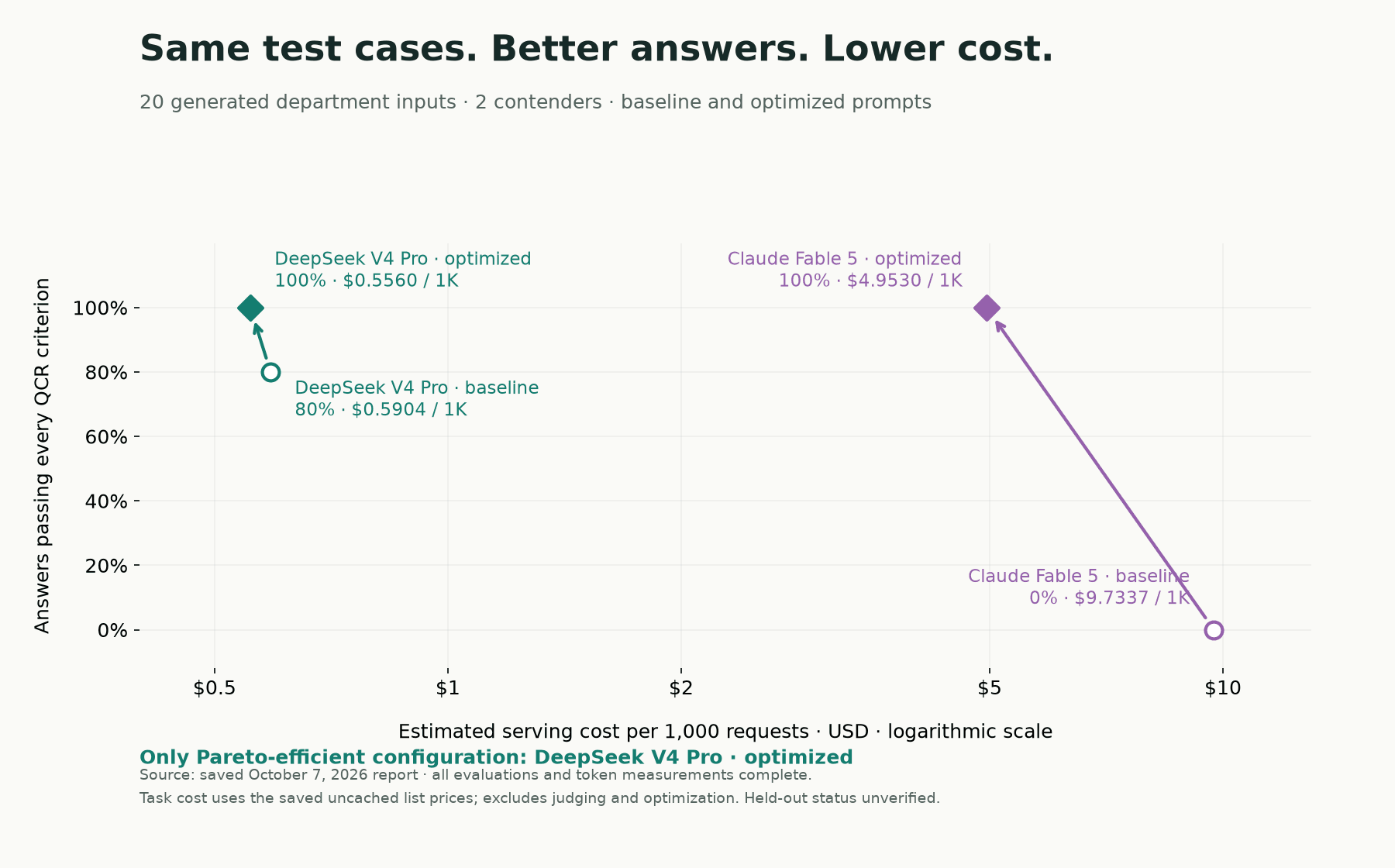
Here are the results from the saved October 7, 2026 benchmark, using the 20 generated department inputs above. These are recorded results, not a new run or a prediction for your task.
| Configuration | Cases passing all criteria | Estimated USD / 1,000 requests |
|---|---|---|
| DeepSeek V4 Pro · baseline | 16/20 · 80% | $0.5904 |
| DeepSeek V4 Pro · optimized | 20/20 · 100% | $0.5560 |
| Claude Fable 5 · baseline | 0/20 · 0% | $9.7337 |
| Claude Fable 5 · optimized | 20/20 · 100% | $4.9530 |
These are all four configurations, using the model identifiers and prices recorded at the time. Every configuration has 20 evaluated cases, no evaluation errors, and token measurements for all 20 requests. Costs use recorded task tokens and the saved uncached list-price snapshot; they exclude judging and optimization. See the saved benchmark summary for the full data.
Optimization improved the observed pass rate and lowered estimated serving cost for both models. DeepSeek V4 Pro’s optimized configuration achieved the same 20/20 pass count as optimized Claude Fable 5 at about 89% lower estimated serving cost. That does not establish equal quality on future requests: 20/20 has a roughly 84–100% confidence interval, and this run’s held-out status was unverified.
The Pareto frontier marks configurations for which no alternative is cheaper with equal or better accuracy, or more accurate at the same cost. Use it to identify candidates for your quality threshold, then inspect their answers.
6. Inspect the answers behind the score
Click Inspect in Supporting Evidence to open Experiment Results. Select a contender and a test case. You can read the JSON input, compare baseline and optimized answers side by side, and review each criterion’s verdict, evaluation method, and explanation.
Start with failures and cases where optimization changed the outcome. For the dermatology input, Claude Fable 5’s baseline answer included explanations after the keywords. The length checker counted each full list item and found 13, 11, 9, 12, and 12 words. The optimized answer returned five three-word items and passed all three criteria.
| Evidence | Baseline | Optimized |
|---|---|---|
| First list item, verbatim | 1. **acne treatment near** – captures high-intent local searches from users seeking acne solutions | 1. acne treatment clinic |
| Exactly five items | Pass | Pass |
| At most three words per item | Fail | Pass |
| Healthcare relevance | Pass | Pass |
| Overall result | Fail · 2/3 criteria | Pass · 3/3 criteria |
Also inspect passing cases: a narrow rubric can accept answers that miss a requirement you forgot to state. If you revise the rubric, apply it to every contender and both prompt versions in a fresh comparison.
Choose the least expensive configuration that meets your quality requirements on representative, independent cases. Keep the prompts, rubric, inputs, and results together so the decision can be checked again.